The information provided in this section ought to be unrelated to the verified version combination outlined in the Installation section above.
=== Install Wx::Demo ===
=== Install Wx::Demo ===
Line 40:
Line 41:
<big><code>C:\> wxperl_demo.pl</code></big>
<big><code>C:\> wxperl_demo.pl</code></big>
== wxGlade - a Perl Friendly(cross-platform) GUI Builder ==
== wxGlade - a Perl Friendly (cross-platform) GUI Builder ==
=== Trigger Warning: wxGlade is written in wxPython, so you must install it if you want ot use wxGlade to build your GUI. ===
Totally worth it!
=== Install wxGlade ===
=== Install wxGlade ===
[https://sourceforge.net/projects/wxglade/ wxGlade] is a GUI builder for wxWidgets applications. It is written in Python, but critically supports outputing Perl code. It is actively developed, the developer is very responsive on Github to bugs and feature requests. It is the closest thing we have in Perl to a RAD (rapid application development) environment (e.g., [https://www.lazarus-ide.org/ Lazarus] for FreePascal).
[https://sourceforge.net/projects/wxglade/ wxGlade] is a GUI builder for wxWidgets applications. It is written in Python, but critically supports outputing Perl code. It is actively developed, the developer is very responsive on Github to bugs and feature requests. It is the closest thing we have in Perl to a RAD (rapid application development) environment (e.g., [https://www.lazarus-ide.org/ Lazarus] for FreePascal).
=== Step 1 - Install Python 3.12 for Windows ===
=== Step 1 - Install Python 3.10.11 for Windows ===
Install via following link,
Install via following link,
Line 65:
Line 69:
=== Step 3- Download and unzip wxGlade ===
=== Step 3- Download and unzip wxGlade ===
https://github.com/wxGlade/wxGlade/archive/refs/tags/v1.1.0.zip (may want to also try [https://downloads.sourceforge.net/project/wxglade/wxglade/1.1.0/wxGlade-1.1.0_win_amd64.zip?ts=gAAAAABnlJMXBQlBk2CGz7kaN89RrjqS4GEmSk7spuPtf-gFaK_VqcAQAiFCT24GT-SYsq8SVVmCjmhkzq0VycLd7ofhOQoVlA%3D%3D&r=https%3A%2F%2Fsourceforge.net%2Fprojects%2Fwxglade%2Ffiles%2Fwxglade%2F1.1.0%2FwxGlade-1.1.0_win_amd64.zip%2Fdownload%3Fuse_mirror%3Dphoenixnap%26use_mirror%3Dphoenixnap%26r%3Dhttps%253A%252F%252Fsourceforge.net%252Fprojects%252Fwxglade%252Ffiles%252Fwxglade%252F1.1.0%252F wxGlade-1.1.0_win_amd64.zip] - the difference between the two is unclear, but both are tested and both work.)
You should probably check if there is a [https://github.com/wxGlade/wxGlade/releases '''new release'''], but to get the latest at the time of this update, download: https://github.com/wxGlade/wxGlade/archive/refs/tags/v1.1.1.zip (may want to also try [https://downloads.sourceforge.net/project/wxglade/wxglade/1.1.0/wxGlade-1.1.0_win_amd64.zip?ts=gAAAAABnlJMXBQlBk2CGz7kaN89RrjqS4GEmSk7spuPtf-gFaK_VqcAQAiFCT24GT-SYsq8SVVmCjmhkzq0VycLd7ofhOQoVlA%3D%3D&r=https%3A%2F%2Fsourceforge.net%2Fprojects%2Fwxglade%2Ffiles%2Fwxglade%2F1.1.0%2FwxGlade-1.1.0_win_amd64.zip%2Fdownload%3Fuse_mirror%3Dphoenixnap%26use_mirror%3Dphoenixnap%26r%3Dhttps%253A%252F%252Fsourceforge.net%252Fprojects%252Fwxglade%252Ffiles%252Fwxglade%252F1.1.0%252F wxGlade-1.1.0_win_amd64.zip] - the difference between the two is unclear, but both are tested and both work.)
[[File:WxgladeWinExample.png|alt=wxGlade running on Windows, showing the design window of a GUI about to be run using wxPerl!|thumb|wxGlade running on Windows, showing the design window of a GUI about to be run using wxPerl!]]
[[File:WxgladeWinExample.png|alt=wxGlade running on Windows, showing the design window of a GUI about to be run using wxPerl!|thumb|wxGlade running on Windows, showing the design window of a GUI about to be run using wxPerl!]]
Via Windows CMD terminal, navigate to the unzip'd directory and run the command,
Via Windows CMD terminal, navigate to the unzip'd directory and run the command,
Line 79:
Line 83:
== Development Workflow Notes ==
== Development Workflow Notes ==
This section outlines some different workflows that are found among members of the community who use wxPerl. Like any workflow, the based on level of experience and particular application.
This section outlines some different workflows that are found among members of the community who use wxPerl. Like any workflow, the based on level of experience and particular application.
[[File:Wxperl-workflow.png|alt=Example layout with Strawberry Perl for running the application and Makefile, vim under MSYS2 for more streamlined workflow. wxGlade is under there, too; when there is a change to the GUI, the project is saved and code generated using "ctrl-g". vim is used to edit the code and will update whenever wxGlade updates it, if you do it right your custom code won't get clobbered.|thumb|Example layout with Strawberry Perl for running the application and Makefile, vim under MSYS2 for more streamlined workflow. wxGlade is under there, too; when there is a change to the GUI, the project is saved and code generated using "ctrl-g". vim is used to edit the code and will update whenever wxGlade updates it, if you do it right your custom code won't get clobbered.]]
=== Editor and <code>git</code> Options on Windows ===
The best way to recreate the "edit-run-fix" workflow of code editing enjoyed by vim users is to install [https://www.msys2.org/ MSYS2] and use its terminal to install both <code>vim</code> and <code>git</code>:
<code><big>pacman -S vim git</big></code>
Note: you do not want to run the Perl code generated by wxGlade inside of the MSYS2 terminal. When you install <code>git</code>, it will install its own perl and clobber Strawberry Perl in your <code>PATH</code>. Run the Perl code for your project from a Strawberry Perl terminal.
Just like the editor options in Windows is not ideal, neither are the Git options (GH's "Git for Windows" is exceptionally awkward to use, not sure how to it is possible to be good in "Windows" tbh; YMMV.) Under MSYS2's terminal, you may install <code>git</code> and use it as you may be accustomed on Linux. You may want to generate an ssh-key, which will be vailable in `~/.ssh/` by default. So you can do all the normal git workflow stuff from there once your key is created and added to your Github keyset.
==== Pro Tip: Turn Off MSYS2's <code>vim</code> Mouse Support and Auto/Smart Indenting ====
I have found that this is required to "copy" text from the MSYS2 <code>vim</code>, you may not need it. But by default <code>vim</code> is aware of the mouse.
To turn all that off, put the following lines in your <code>~/.vimrc</code> file:
 set mouse=
 set noautoindent
 set nosmartindent
 set nocindent
=== Using wxGlade's "Single file" + "''Keep use code''" Options ===
=== Using wxGlade's "Single file" + "''Keep use code''" Options ===
Line 97:
Line 121:
Below are the initial instructions for generating an EXE file. There are also many ways that wxPerl developers go about doing, based on their use case and experience.
Below are the initial instructions for generating an EXE file. There are also many ways that wxPerl developers go about doing, based on their use case and experience.
=== PAR::Package and WX::Perl::Packager ===
=== PAR::Package, App::PP::Autolink, and WX::Perl::Packager ===
==== Step 1 - Install PAR::Package, App::PP::Autolink, and Wx::Perl::Packager ====
==== Step 1 - Install PAR::Package and Wx::Perl::Packager ====
'''Note''': <code>pp_autolink</code>, provided by <code>App::PP::Autolink</code> has proven to be absolutely critical to finding the required DLLs that need to be added manually to the <code>wxpar</code> command below via the <code>--link</code> flag.
See [https://github.com/wxGlade/wxGlade/issues/568 this Github issue] for wxGlade, where both were fixed. At the time of this writing, the changes. have not been put out in an official release; but they are applied in the master branch.
See [https://github.com/wxGlade/wxGlade/issues/568 this Github issue] for wxGlade, where both were fixed. At the time of this writing, the changes. have not been put out in an official release; but they are applied in the master branch.
==== Special Cases ====
===== <code>Makefile</code> for an Application uses HTTP::Tiny and calls out to SSL-enabled sites =====
Example - [https://github.com/StormSurgeLive/nhc-advisory-gui/blob/master/asgs-storm-bug.pl https://github.com/StormSurgeLive/nhc-advisory-gui/l]
(copied from the [https://github.com/StormSurgeLive/nhc-advisory-gui/blob/master/Makefile Makefile]) - Note, mentions using [https://metacpan.org/pod/App::PP::Autolink App::PP::Autolink] to sus out required DLLs (provides <code>pp_autolink</code>, which helped!)
It is worth repeating that <code>pp_autolink</code>, provided by <code>App::PP::Autolink</code> has proven to be absolutely ''critical'' to finding the required DLLs that need to be added manually to the <code>wxpar</code> command below via the <code>--link</code> flag.
If you are having problems finding all the DLLs (some which may not be obvious until the EXE generated is tried on a different machine,) you need to give <code>pp_autolink</code> a shot.
=== PPL (portable Perl loader) ===
=== PPL (portable Perl loader) ===
... to fill in
... to fill in (Johan?)
== Creating Installers for Windows EXEs ==
== Creating Installers for Windows EXEs ==
Line 177:
Line 236:
'''Cross-Platform GUI programming with wxWidgets''' ([https://wxwidgets.org/docs/book/ free PDF!!]) by Julian Smart and Kevin Hock (with Stefan Csomor) is an old, but nice resource to have. It mentions wxPerl quite a bit and has a nice index of tools to help the wxWidgets GUI programmer, regardless of the language they are using. In particular, "Appendix E: Third-Party Tools for wxWidgets" is a very interesting read.
'''Cross-Platform GUI programming with wxWidgets''' ([https://wxwidgets.org/docs/book/ free PDF!!]) by Julian Smart and Kevin Hock (with Stefan Csomor) is an old, but nice resource to have. It mentions wxPerl quite a bit and has a nice index of tools to help the wxWidgets GUI programmer, regardless of the language they are using. In particular, "Appendix E: Third-Party Tools for wxWidgets" is a very interesting read.
=== Longer List of RAD Tools and GUI Builders ===
=== Longer List of RAD Tools and GUI Builders* ===
See this (internal [[Portal:Software Development Tools#wxPerl (wxWidgets wrapper)|page]]).
* [[Developing and Distributing wxPerl Applications on Windows#wxGlade - a Perl Friendly(cross-platform) GUI Builder|wxGlade]] (''Latest at this time'', '''Version 1.1.0, July 7, 2024''')
* [https://web.archive.org/web/20131020024033/http://www.wxdesigner-software.de/download.html wxDesigner] (''Latest at this time'', '''2.14 - wxWidgets 2.8.8/ 2.20a - wxidgets pre-3.0, May 2009''')
** outputs Perl code
** archived but a trial is downloadable [[https://web.archive.org/web/20131020024033/http://www.wxdesigner-software.de/download.html here]] (archive.org)
** Reliable contact for license: ''undetermined at this time''
* [http://www.anthemion.co.uk/dialogblocks/download.htm DialogBlocks] - '''('''''Latest at this time'', '''Version 5.18, August 21st, 2024)'''
** can export C++, XRC, which wxGlade should be able to import
** No Perl export (see XRC)
** Cross Platform (Windows, Mac, Linux)
** Registration required, but support is discontinued - email support@anthemion.co.uk, they may just give you a free key if you are nice :-)
''*You may want to also check this duplicated internal [[Portal:Software Development Tools#wxPerl (wxWidgets wrapper)|page]].''
This is a critical ability for any freelance Perl developer, since it compliments a Perl journeyman's ability to do many things on servers, such as create remote services. Being able to transfer these skills to the desktop environment, particularly one that is full of users who are okay with paying for software (i.e., Windows). In short, Perl programmers who want to make a living on their own need to know how to create and distribute Windows GUI applications; this page covers a large piece of how to do that.
wxPerl GUI running on Windows as a double-clicable EXE file! Created using RAD-ish tool, wxGlade. See more images on Github.
Instructions are provided with the versions detailed below. If there are newer versions of any of the modules, you may try it out (of course); but understand they have not been tried out and shown to work like version combinations below.
wxGlade is a GUI builder for wxWidgets applications. It is written in Python, but critically supports outputing Perl code. It is actively developed, the developer is very responsive on Github to bugs and feature requests. It is the closest thing we have in Perl to a RAD (rapid application development) environment (e.g., Lazarus for FreePascal).
Last tested on 25 Jan 2025, although later versions of Python 3 were tested (specifically, 3.12.8), wxPython would install but not run wxGlade properly
install as admin (checkbox should be already checked; also opt'd to add "python" to the PATH)
Note: if this fails, you may need to reinstall pip; but it should be available in the CMD window. Based on experience, pip doesn't seem to be available via the Strawberry Perl terminal, so be sure to get a standard Windows CMD window to do this part.
This section outlines some different workflows that are found among members of the community who use wxPerl. Like any workflow, the based on level of experience and particular application.
Example layout with Strawberry Perl for running the application and Makefile, vim under MSYS2 for more streamlined workflow. wxGlade is under there, too; when there is a change to the GUI, the project is saved and code generated using "ctrl-g". vim is used to edit the code and will update whenever wxGlade updates it, if you do it right your custom code won't get clobbered.
The best way to recreate the "edit-run-fix" workflow of code editing enjoyed by vim users is to install MSYS2 and use its terminal to install both vim and git:
pacman -S vim git
Note: you do not want to run the Perl code generated by wxGlade inside of the MSYS2 terminal. When you install git, it will install its own perl and clobber Strawberry Perl in your PATH. Run the Perl code for your project from a Strawberry Perl terminal.
Just like the editor options in Windows is not ideal, neither are the Git options (GH's "Git for Windows" is exceptionally awkward to use, not sure how to it is possible to be good in "Windows" tbh; YMMV.) Under MSYS2's terminal, you may install git and use it as you may be accustomed on Linux. You may want to generate an ssh-key, which will be vailable in `~/.ssh/` by default. So you can do all the normal git workflow stuff from there once your key is created and added to your Github keyset.
Pro Tip: Turn Off MSYS2's vim Mouse Support and Auto/Smart Indenting
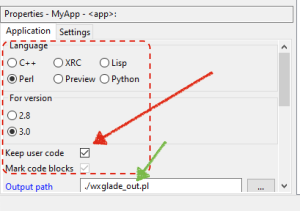
wxGlade has some settings that tells it to not overwrite changes you made in the output Perl script, but beware - this option is not on by default. That means that means that your file will get overwritten if you tell wxGlade to generated new code again. The general workflow is as follows:
start a new project (or open an existing one)
click on the root "Application" object in the object viewer
find the output pane, set the output to be "Perl"
set version of wxWidgets to be "3.0"
Recommended settings for using wxGlade for Perl development.check "Keep user code", this will make sure wxGlade doesn't over write code that is outside the bounds of very clearly marked blocks in the code
Using wxGlade's "Seperate file for each class" Option
This section is more of a work in progress since a reliable method of distributing single file executables (or developing installation packages for Windows) is still an open question, there is hope that this will end up being a relatively smooth process. Needless to say, it is critical for Perl developer to be able to distribute Perl based GUI applications as single file (.exe) or via installation on Windows. The client should NOT need to be running through any of the instructions above to run a program that you would like to sell them for actual money.
Below are the initial instructions for generating an EXE file. There are also many ways that wxPerl developers go about doing, based on their use case and experience.
PAR::Package, App::PP::Autolink, and WX::Perl::Packager
Note: pp_autolink, provided by App::PP::Autolink has proven to be absolutely critical to finding the required DLLs that need to be added manually to the wxpar command below via the --link flag.
earlier versions of wxGlade introduced an improper idiom at the bottom of the generated Perl script that caused a problem when running via a PAR::Packed packed executable. TLDR; remove the "unless(caller)" block and just run the Wx event loop unfettered. For more information, please read the PAR::FAQ.
earlier versions of wxGlade also used a non-Exporter import tage that wxpar could not properly follow; see the code "before" and "after" below:
use Wx qw[:allclasses];
use strict;

...

package main;

unless(caller){
    my $local = Wx::Locale->new("English", "en", "en"); # replace with ??
    $local->AddCatalog("app"); # replace with the appropriate catalog name

    my $app = MyApp->new();
    $app->MainLoop();
}
Should be modified to look like the following:
use Wx;
use strict;

...

package main;

my $local = Wx::Locale->new("English", "en", "en"); # replace with ??
$local->AddCatalog("app"); # replace with the appropriate catalog name

my $app = MyApp->new();
$app->MainLoop();
See this Github issue for wxGlade, where both were fixed. At the time of this writing, the changes. have not been put out in an official release; but they are applied in the master branch.
(copied from the Makefile) - Note, mentions using App::PP::Autolink to sus out required DLLs (provides pp_autolink, which helped!)
 all:
         wxpar --verbose -o ./dist/nhc-explorer.exe -l c:/strawberry/c/bin/libcrypto-3-x64__.dll -l c:/strawberry/c/bin/zlib1__.dll -l c:/strawberry/c/bin/libssl-3-x64__.dll ./asgs-storm-bug.pl --gui
         wxpar --verbose -o ./dist/DEBUG-nhc-explorer.exe -l c:/strawberry/c/bin/libcrypto-3-x64__.dll -l c:/strawberry/c/bin/zlib1__.dll -l c:/strawberry/c/bin/libssl-3-x64__.dll ./asgs-storm-bug.pl

# It was an adventure finding all the dependencies related to the wxpar command,
# particularly those around what was needed, the basic process entailed:
# 1. use wxpar, which generates an options files with all the Wx DLLs
# 2. installed, App::PP::Autolink, which provides the utility "pp_autolink"; this
#    utility scans the .pl file you're packing (in this case, "asgs-storm-bug.pl,")
#    for DLLs - lo' and behold, it found the ones I needed; in particular the critical
#    one that was not getting picked up by pp or wxpar, "libcrypto-3-x64___.dll!"
# 3. ran the "wxpar" command above
# 4. tested in a non-Strawberry Perl window (MSYS2 terminal) using the command,
#
#      PERL_DL_DEBUG=5 dist/nhc-explorer.exe
#
#    I learned about this command while searching, here:
#
#      https://stackoverflow.com/questions/423330/why-cant-dynaloader-pm-load-ssleay-dll-for-netssleay-and-cryptssleay
#
It is worth repeating that pp_autolink, provided by App::PP::Autolink has proven to be absolutely critical to finding the required DLLs that need to be added manually to the wxpar command below via the --link flag.
If you are having problems finding all the DLLs (some which may not be obvious until the EXE generated is tried on a different machine,) you need to give pp_autolink a shot.
A possible "old school" approach, may be to use Office'97 Office Developer Edition (ODE) - via Access'97 there is an installer builder - this is a last resort and still needs to be verified to work for non-Access distributions
Inno Setup (github) - Inno Setup is a free installer for Windows programs by Jordan Russell and Martijn Laan. First introduced in 1997, Inno Setup today rivals and even surpasses many commercial installers in feature set and stability.
The following sections are "works in progress," and remain open questions (for this author anyway). Contributions to develop these sections are greatly appreciated, but not expected. Over time I will update these sections as I learn more about using wxGlade and Perl on Windows.
While wxpar does indeed create EXEs that can run on Windows machines that do not otherwise have any required libraries on them, I have found some early problems that are most likely due to lack of experience in this area. An understanding of this area is forthcoming.
XRC is a language agnostic and XML based way of describing the GUI layout for wxWidgets. It appears to be the right way to maintain the GUI layout of your production grade program, while maintaining the set of Perl handlers in your own source tree. Think of XRC as the separation of the controller and view in MVC - it to GUI programming what templates are to web application programming. It seems that as one advances his skills in this area, he will want to use XRC. The benefit also of this is that one may be able to create controllers in multiple languages rather than tie the GUI construction in Perl or some other language exclusive - of course, wxGlade can output in different languages, but none is as abstract as XRC.
Wx::Demo example of loading an XRC file; wxGlade can output directly to XRC, which can then be read in Perl. This is how.
Wx::Demo has a few good examples of running XRX applications; wxGlade can output XRC, but it is not aware of any language bindings or drivers for it.
Experience with managing XRC files may allow us as Perl programmers to use RAD tools and GUI builders that were not intended to support wxPerl, but can output XRC files. DialogBlocks is such a professional and commercial GUI builder for wxWidgets, and it is actively maintained.
This great, but out of print wxWidgets book is available for free (PDF) at https://wxwidgets.org/docs/book/. It mentions wxPerl and has an index of tools and programs that any wxWidgets programmer may find interest.
Cross-Platform GUI programming with wxWidgets (free PDF!!) by Julian Smart and Kevin Hock (with Stefan Csomor) is an old, but nice resource to have. It mentions wxPerl quite a bit and has a nice index of tools to help the wxWidgets GUI programmer, regardless of the language they are using. In particular, "Appendix E: Third-Party Tools for wxWidgets" is a very interesting read.